Image Masking: A Complete Guide for Clean, Professional Image Editing (2026)
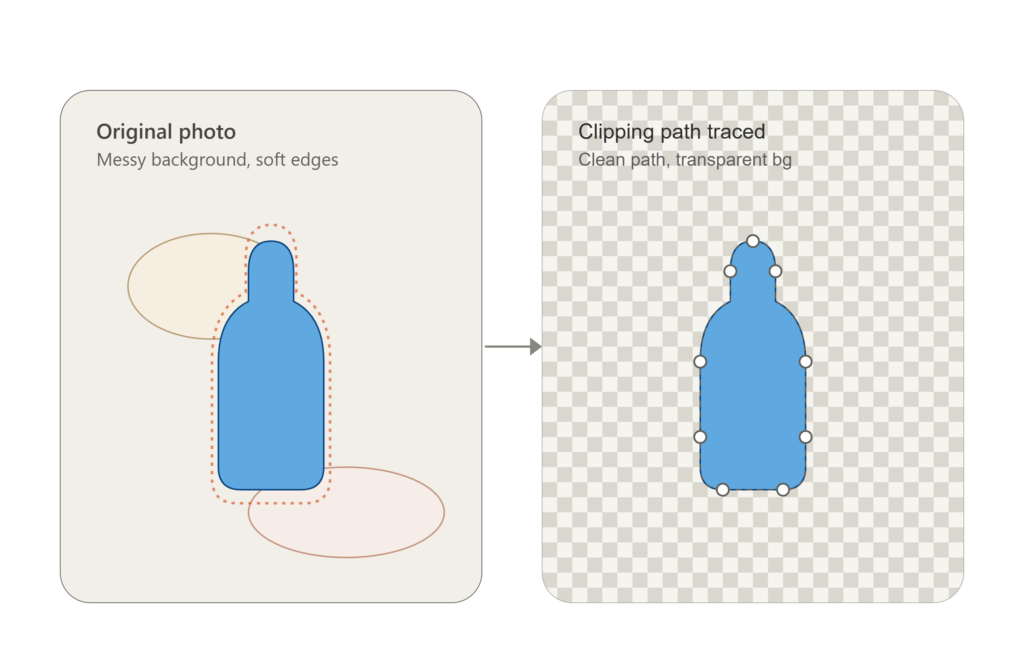
What Is Image Masking? Image masking is a professional photo editing technique used to remove or isolate complex objects from their backgrounds without losing fine details. Unlike a clipping path, which works best on hard edges, image masking is designed for soft and intricate edges like hair, fur, feathers, transparent fabrics, smoke, glass, and tree branches. At Clipping Beast, our editors use advanced masking techniques to preserve every tiny detail, giving your images a clean and natural look that’s ready for eCommerce, advertising, print, and social media. Quick Facts About Image Masking Feature Details Best For Hair, Fur, Transparent Objects, Soft Edges Editing Method Adobe Photoshop Image Masking Starting Price From $0.99 per image Turnaround 6–24 Hours File Delivery PNG, PSD, TIFF, JPG Revisions Free Revisions Quality 100% Hand Edited How Does Image Masking Work? Professional image masking follows a careful editing process. 1. Analyze the Image The editor checks whether the subject contains soft edges, transparency, or complex details that cannot be handled with a clipping path. 2. Choose the Right Masking Method Different images require different masking techniques depending on their complexity. 3. Separate the Subject The unwanted background is carefully removed while preserving natural edges. 4. Refine Fine Details Hair strands, fur, fabric edges, and transparent areas are cleaned manually for a realistic finish. 5. Final Quality Check Every image is zoomed in and reviewed to ensure smooth edges and a professional appearance. Types of Image Masking Layer Mask Layer Mask is ideal for non-destructive editing. It allows editors to hide or reveal parts of an image without permanently deleting pixels. Alpha Channel Mask Alpha Channel Mask is commonly used for highly detailed selections where precision is essential. Transparency Mask Transparency Mask helps preserve semi-transparent objects like glass bottles, veils, smoke, or water splashes. Hair Masking Hair Masking is one of the most common image masking services. It keeps every strand of hair looking natural after background removal. Fur Masking Perfect for pets, stuffed toys, jackets, and animal photography where fine fur details must remain intact. Image Masking vs Clipping Path Image Masking Clipping Path Best for soft edges Best for hard edges Ideal for hair and fur Ideal for products with smooth borders Preserves transparency Cannot preserve transparent areas More detailed editing Faster editing process Uses Photoshop masking tools Uses the Pen Tool In many professional projects, Clipping Beast combines clipping paths with image masking to achieve the highest-quality results. When Should You Use Image Masking? Image masking is recommended when your image includes: Industries That Need Image Masking eCommerce Online stores need clean product images that meet marketplace requirements. Fashion Fashion brands use image masking to keep clothing details and hairstyles looking natural. Photography Professional photographers rely on masking for portrait editing and creative compositions. Advertising Marketing agencies use masking to create eye-catching promotional graphics. Jewelry Luxury brands preserve delicate reflections while removing distracting backgrounds. Benefits of Image Masking Professional Appearance Your images look cleaner, sharper, and more polished. Natural Hair Details Every strand of hair stays realistic after editing. Better Product Presentation High-quality product images help customers trust your brand. Flexible Background Replacement You can place your subject on white, transparent, or custom backgrounds. Improved Marketing Materials Professionally edited images work better for websites, catalogs, and social media campaigns. Why Choose Clipping Beast? At Clipping Beast, we specialize in high-quality image masking performed by experienced human editors. We deliver: Whether you need a single portrait or thousands of eCommerce product photos, our team ensures consistent, high-quality results every time. Tips for Better Image Masking Results These simple steps help achieve cleaner and more accurate masking results. Frequently Asked Questions What is image masking used for? Image masking is used to remove backgrounds from images with soft edges while preserving details like hair, fur, transparency, and smoke. Is image masking better than a clipping path? It depends on the image. Clipping paths work best for hard-edged objects, while image masking is the better choice for complex subjects with fine details. Which software is used for image masking? Most professional editors use Adobe Photoshop because it offers advanced masking tools and precise edge refinement. How long does image masking take? Simple projects can be completed within a few hours, while complex images with intricate details may require more editing time. Can image masking keep transparent objects? Yes. Image masking is specifically designed to preserve transparency in objects like glass, water, and translucent fabrics. Final Thoughts Image masking is the best solution when precision matters. It preserves fine details that other background removal methods simply cannot handle. Whether you’re editing portraits, fashion photography, product images, or advertising visuals, professional masking delivers cleaner, more natural-looking results. At Clipping Beast, we combine expert editing skills with careful quality control to produce images that are ready for websites, online marketplaces, catalogs, and marketing campaigns. If you need accurate background removal with flawless detail, our image masking service is built to deliver exceptional results.
What Is a Clipping Path? The Hidden Reason Some Product Photos Sell (2026 Guide)
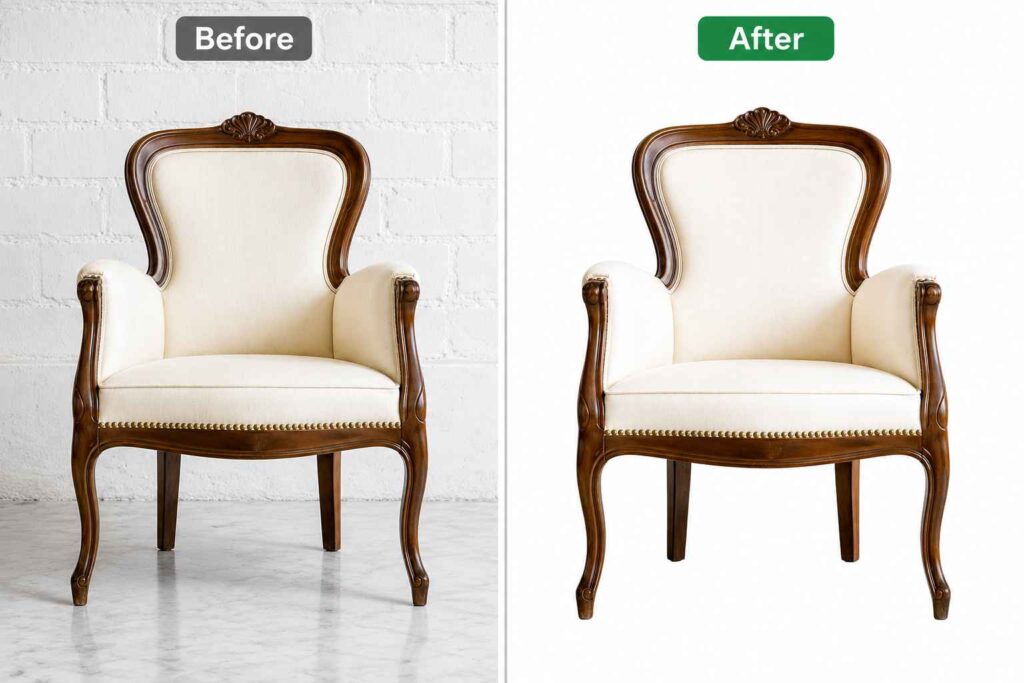
A clipping path is a professional image editing technique in Adobe Photoshop that uses a hand-drawn vector path to separate an object from its background with exceptional precision. Unlike automatic tools, it delivers clean, smooth edges while preserving the subject’s natural details. Clipping paths are widely used for product photography, e-commerce, advertising, and print design because they create high-quality images that look polished and consistent. This method makes it easy to replace backgrounds, improve visual appeal, and prepare images for any digital or printed platform. What Is Clipping Path? A clipping path is a vector outline. You draw it around the object using the Pen Tool, either in Photoshop or Illustrator. Once you close that outline, whatever’s inside stays. Whatever’s outside gets tossed. I usually explain it to clients like this: imagine tracing something with scissors, except it’s digital, and if you’re skilled, the cut is basically perfect. No jagged bits. No leftover halo around the edge. Just a clean subject you can drop onto white, transparent, or a completely different background. That one step is why the product photos on big retail sites look like they’re floating in nothing. And it’s also why cheap product photos look cheap, no path, no clean cut, and honestly, no sale. Why This Actually Matters (More Than People Think) Here’s the part most articles skip over. Your photo is often the only thing between a shopper and a purchase. Nobody reads the description first. They look at the picture. If there’s a messy background, some weird leftover shadow, or rough edges around your product, people notice, even if they couldn’t tell you exactly what’s wrong. They just scroll. And you never even find out you lost that sale. A clean path fixes this fast. Sharp edges make a product look like it’s worth buying. Clipping Path vs Image Masking — People Mix These Up Constantly I get asked about this all the time, and honestly the confusion costs people money because they end up paying for the wrong service. A clipping path is for hard, clean edges. Bottles. Boxes. Shoes. A phone. The line is sharp, and a pixel is either kept or it’s gone, no middle ground at all. Image Masking is for the messy stuff. Hair. Fur. Loose threads on fabric. Smoke. Instead of one hard line, masking blends the edge using shades of gray so it doesn’t look like a sticker slapped onto a new background. Quick rule I give clients: clean outline, ask for a path. Hair or soft edges, ask for masking, or sometimes both together. If a provider tries to sell you the same fix for everything, that’s usually a sign they don’t really know the difference. The Different Types of Clipping Paths Not every job takes the same time, and honestly not every job should cost the same either. Simple: basic shapes, smooth edges. A mug, a candle, a box. Takes a few minutes if the editor knows what they’re doing. Example: A plain ceramic mug on a solid-colored background. Medium: a bit more going on. Shoes with laces, a bag with a handle, that sort of thing. Takes more time since there are extra parts to trace carefully. Example: A leather handbag with a handle and a hanging tassel. Complex Clipping Path: This type is used for objects with detailed shapes, sharp curves, and many small parts. It needs a lot of anchor points and careful tracing to keep every edge clean and accurate. Example: A chandelier with layered crystal drops and curved metal arms that need precise cutting. Super Complex: the tough ones. Flowing hair, fur clothing, busy backgrounds. Usually this is where masking gets combined with the path anyway. Example: A double-band diamond ring with tiny stones set close together, needing precise tracing around every edge. Knowing which bucket your images fall into means you get an honest quote instead of a random number pulled from thin air. How Clipping Path Actually Gets Made Here’s the real process, step by step: Sounds easy written out like that. It isn’t, not really. A rushed job leaves rough edges or a faint color halo hanging around the product. Done right, it looks like the background was never there in the first place. AI Clipping Path vs Manual — Which One Should You Actually Trust? Everyone’s got an opinion on AI background removal right now, so let me just be straight about it. AI is genuinely fast. It can chew through hundreds of simple images in the time it’d take a person to finish two or three. It’s usually cheaper too. And on easy shots, plain background, high contrast, it does a decent job. Where it falls apart is detail. Hair, fur, thin jewelry chains, AI tends to leave things jagged or half-erased. Glass and chrome confuse it. So does anything where the background color is close to the product color. And it can’t make judgment calls, like whether to keep a soft shadow because it looks natural, or whether that faint highlight is part of the product or just noise. If your catalog is simple stuff on white backgrounds, AI will probably save you money. If you’re shooting jewelry, fabric, hair, or glass, a human editor usually saves you more in the long run, just not in the way you’d expect. You save it in returns and refunds you never had to deal with. Manual Clipping Path: Why It Still Wins Where It Actually Counts A manual clipping path just means a real person zoomed into your photo and traced it by hand with the Pen Tool. No guessing software, no shortcuts. It beats AI in a few specific spots. Fine detail stays sharp instead of blurry. Reflections on glass or metal look natural instead of flattened. Busy backgrounds don’t trip up a trained eye the way they trip up an algorithm. And judgment calls, keeping a shadow, fixing a stray highlight, that’s something only a person really gets right. If your image is
Why Hand-Drawn Clipping Paths Still Matter for Professional Product Photos
Online shoppers often decide within seconds whether they want to learn more about a product. High-quality product photos help create a strong first impression. This is why businesses invest in professional image editing services. One of the most important editing techniques is the clipping path. A clipping path helps remove unwanted backgrounds and keeps the focus on the product. While AI tools have become popular, hand-drawn clipping paths remain the preferred choice for businesses that want the best image quality. Manual editing delivers cleaner edges, better accuracy, and a more professional appearance. What Is a Clipping Path? A clipping path is a closed vector outline created around an object using the Photoshop Pen Tool. The path allows editors to separate the subject from the background. Once the path is completed, the background can be removed, replaced, or made transparent. This technique is widely used in eCommerce, advertising, photography, and print design. Unlike automatic tools, a hand-drawn clipping path follows every edge carefully. This creates a smooth and natural result that looks professional on any platform. Why Manual Clipping Paths Are Better Than AI Many AI-powered tools can remove backgrounds quickly. However, speed does not always mean quality. AI often struggles with detailed products, curved edges, and complex shapes. It may leave rough edges or remove important parts of the image. A hand-drawn clipping path is created by a skilled editor who carefully traces every detail. This level of attention produces cleaner results and helps maintain the original appearance of the product. For businesses that depend on professional product photos, manual clipping paths provide greater accuracy and consistency. The Importance of Clipping Paths for eCommerce Product photos play a major role in online sales. Customers cannot touch or examine products in person, so images become their main source of information. Clean, high-quality photos help build trust and encourage purchases. Many marketplaces such as Amazon, Shopify, eBay, and Walmart require product images with white backgrounds. A clipping path service helps businesses meet these requirements. Professional images can improve product listings, increase customer engagement, and support better conversion rates. How Fashion Brands Use Clipping Paths Fashion companies rely heavily on image quality. Clothing, shoes, handbags, and accessories need to be presented in a clean and attractive way. Hand-drawn clipping paths help remove distractions from product photos and keep attention on the item being sold. Fashion brands often use clipping paths for lookbooks, online stores, catalogs, and advertisements. The result is a polished and professional presentation that helps customers focus on product details. Clipping Paths for Print and Advertising Projects Print designers and advertising agencies frequently use clipping paths in their projects. Marketing materials often require isolated product images that can be placed on different backgrounds. A clipping path allows designers to move products into brochures, flyers, posters, and catalogs without losing quality. Because clipping paths are vector-based, they create sharp edges that remain clean even in high-resolution printing. This helps brands maintain a professional appearance across all marketing materials. Electronics Products Need Precision Electronics products often contain small details such as buttons, ports, wires, and screens. These details can be difficult for AI tools to process correctly. Hand-drawn clipping paths provide the precision needed to isolate every part of the product. Whether it is a smartphone, laptop, gaming accessory, or electronic component, accurate editing helps showcase the product clearly. This makes it easier for customers to understand what they are buying and improves the overall presentation of the product. Furniture and Home Décor Image Editing Furniture products usually have unique shapes and complex structures. Tables, chairs, sofas, and decorative items often require detailed editing to achieve professional results. A hand-drawn clipping path allows editors to remove backgrounds while preserving every design element. Furniture companies use these edited images for websites, catalogs, room scenes, and advertising campaigns. Clean images help customers visualize products in their own spaces and create a stronger shopping experience. Benefits of Outsourcing Clipping Path Services Managing large volumes of product photos can be time-consuming. Businesses often have hundreds or thousands of images that require editing. Outsourcing clipping path services helps save time and resources. Professional editors can process images quickly while maintaining consistent quality. This allows businesses to focus on important tasks such as marketing, customer service, and sales. Fast delivery also helps companies launch products and promotions without unnecessary delays. What to Look for in a Clipping Path Service Provider Not all clipping path services offer the same quality. Businesses should choose a provider that focuses on manual editing rather than automated solutions. Important factors include experienced editors, affordable pricing, fast turnaround times, unlimited revisions, and support for multiple file formats. Reliable communication and consistent quality are also essential. A trusted clipping path company can help businesses maintain professional standards and improve their brand image. Why Businesses Choose Clipping Beast Clipping Beast has become a trusted name for hand-drawn clipping path services. The company focuses on 100% manual pen-tool editing to deliver accurate and professional results. Their services start at just $0.39 per image, making them an affordable option for businesses of all sizes. With fast turnaround times, transparent PNG delivery, unlimited revisions, and experienced editors, Clipping Beast helps brands achieve high-quality product images. Whether you operate an eCommerce store, photography studio, or advertising agency, Clipping Beast provides the precision and consistency needed to create professional product presentations. FAQs What is a clipping path? A clipping path is a vector outline created around an object using the Photoshop Pen Tool. It allows the subject to be separated from the background for editing purposes. Is Clipping Beast’s clipping path service manual? Yes. Clipping Beast provides 100% hand-drawn clipping paths created with the Photoshop Pen Tool for maximum accuracy and quality. How much does clipping path service cost? Clipping Beast offers clipping path services starting at $0.39 per image. Pricing depends on the complexity of the image. What is the turnaround time for clipping path services? Most projects are completed within 6 to 12 hours, depending on image complexity and